


 Github Stars:
 Last Commit:
  Created:

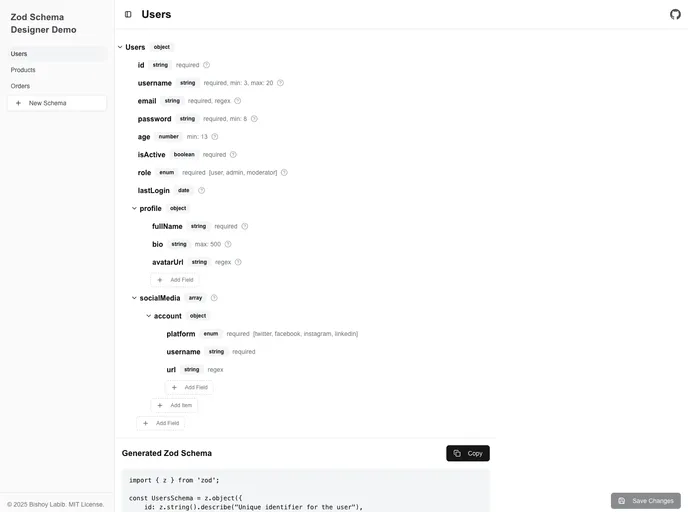
Overview
The Zod Schema Designer is an innovative tool that offers a user-friendly interface for creating and editing Zod schemas visually. Ideal for developers looking to streamline their schema generation process, this component allows for seamless integration into any project utilizing the shadcn CLI. By combining functionality with flexibility, the Zod Schema Designer empowers users to define complex data structures without getting bogged down in code.
Whether you’re a seasoned developer or just starting out, the Zod Schema Designer simplifies schema management. With its robust features and intuitive design, it enhances productivity and fosters creativity when dealing with Zod schemas.
Features
Visual Schema Editor: Offers a user-friendly interface that supports nested fields, making it easy to visualize complex schema structures.
Detailed Properties Panel: Provides an extensive configuration panel for each field, ensuring that all necessary details can be set with precision.
Generated Code: Optionally generates Zod schema code, allowing users to see the code behind their visual designs instantly.
Support for Various Field Types: Facilitates a wide range of field types including string, number, boolean, array, object, enum, date, and calculated fields for maximum versatility.
Customizable Validation Options: Users can tailor validation rules to meet specific requirements, enhancing the accuracy of their data handling.
Flexible Input: Accepts both JSON and Zod schemas as initial inputs, catering to varied project needs.
Output Capabilities: Delivers both JSON and Zod schemas when saving, allowing for easy integration into existing projects.
Styling Customization: Easily modify the appearance by adjusting the component’s CSS or overriding default UI components for a personalized touch.






























































