


 Github Stars:
 Last Commit:
  Created:



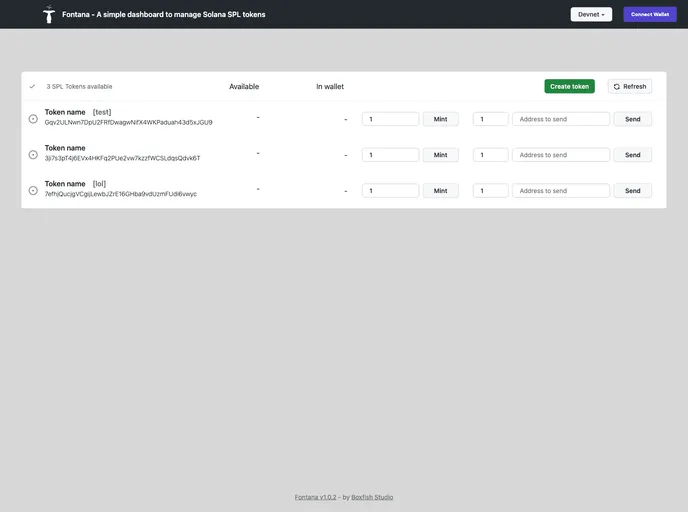
Overview:
The analyzed product is a token management application that allows users to create, mint, and transfer SPL tokens. It supports both mainnet and devnet and can be used with various compatible wallets such as Phantom, Solflare, Torus, Sollet, Glow, and Slope. The application offers two operation modes: wallet-based and server-based. In wallet mode, token operations are performed by the connected wallet account, while in server mode, operations are handled by a server-configured account. The application provides persistence for newly created tokens in server mode.
Features:
- Create, mint, and transfer SPL tokens: Users can create new tokens, perform minting operations, and transfer tokens to other accounts.
- Mainnet and devnet support: The application is compatible with both mainnet and devnet environments.
- Configurable RPCs: Users can configure the Remote Procedure Calls (RPCs) used by the application.
- Compatible with multiple wallets: The application can be used with various wallets including Phantom, Solflare, Torus, Sollet, Glow, and Slope.
- Two operation modes: The application offers two modes of operation: wallet-based mode and server-based mode.
- Wallet mode: In this mode, token operations are performed by the connected wallet account.
- Server mode: In server mode, token operations are handled by an account configured in the server.
- Persistence of newly created tokens: In server mode, newly created tokens are stored in a dedicated database for persistence.
Installation:
To install the theme and run the development server:
- Clone the repository.
- Run the development server.
- Access the application at http://localhost:3000.
The application requires the following environment variables:
- [Variable 1]: [Description of variable 1]
- [Variable 2]: [Description of variable 2]
- [Variable 3]: [Description of variable 3]
Additionally, if you want to configure the application to manage certain tokens by default, you need to configure them in the config file and add the corresponding environment variables. For example, you can add a new environment variable called NEXT_PUBLIC_WALLET_1 corresponding to the WALLET_1 keypair. You will need to add as many new environment variables as wallet ids are used in your configuration file.
Summary:
The analyzed product is a token management application that allows users to create, mint, and transfer SPL tokens. It supports both mainnet and devnet environments and is compatible with various wallets. The application offers two operation modes: wallet-based and server-based, and provides persistence for newly created tokens in server mode. Installation requires cloning the repository and running the development server, along with configuring the necessary environment variables.





























































