


 Github Stars:
 Last Commit:
  Created:



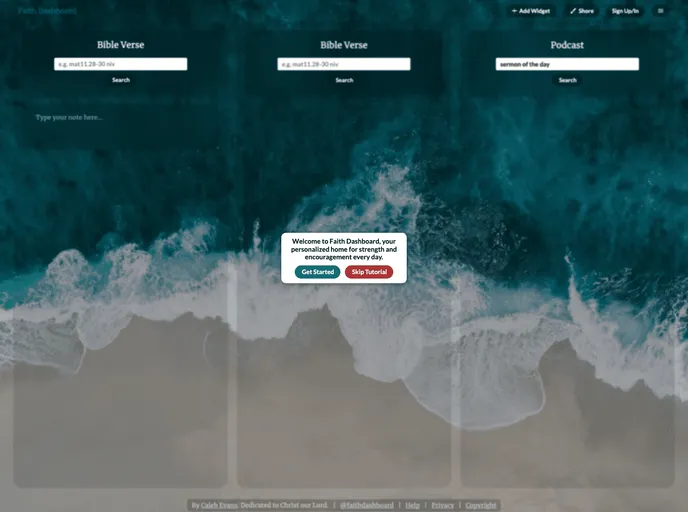
Overview:
Faith Dashboard is a private board for storing and accessing your favorite Bible verses, sermons, and other resources that provide encouragement. It allows users to keep the dashboard open in a browser tab and easily come back to it whenever needed. The dashboard aims to provide strength and inspiration to users in their everyday lives.
Features:
- Private Board: Users can create a personal board where they can store their favorite Bible verses, sermons, and other resources privately.
- Easy Access: The dashboard can be kept open in a browser tab, allowing users to easily access it whenever they need encouragement.
- Organization: Users can organize their resources using categories or tags, making it easier to find specific content.
- Supabase Integration: The dashboard utilizes Supabase for data storage and management, ensuring reliable and efficient performance.
Installation:
To set up Faith Dashboard, follow the steps below:
Install packages:
- Faith Dashboard uses pnpm for package installation and management. Make sure you have pnpm installed on your system.
- Run the following command to install the required packages:
pnpm install
Set up Supabase:
- Install Supabase and its dependencies using Homebrew.
- Once installed, initialize Supabase and start the Supabase services.
- The
supabase startcommand will generate a set of URLs and keys specific to your local instance of Supabase. - Add the API URL and anon key values to your
.env.localfile.
Run the app:
- The local server for Faith Dashboard will be available at http://localhost:3000.
- Launch the app by running the following command:
npm start
Summary:
Faith Dashboard is a powerful tool for individuals seeking daily spiritual strength and encouragement. With its private board feature, users can store their favorite Bible verses, sermons, and other resources and conveniently access them whenever needed. The integration of Supabase ensures efficient data management and organization. Install Faith Dashboard today to enhance your spiritual journey.





























































