


 Github Stars:
 Last Commit:
  Created:


Overview
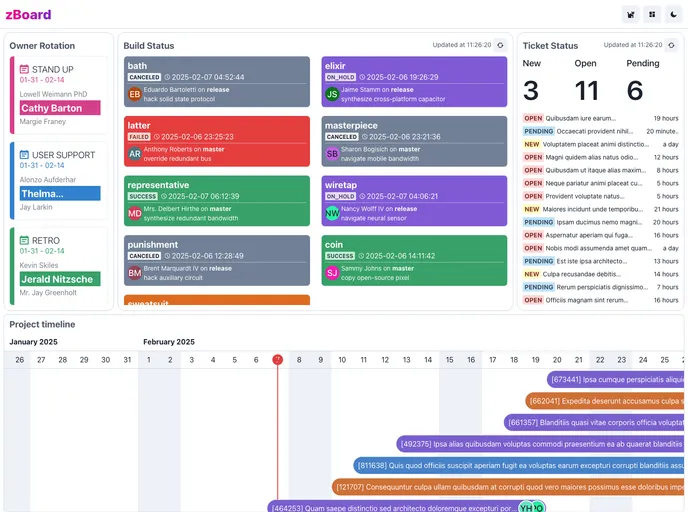
Designed for DevOps teams, this product is a visualization tool that allows users to track daily information. It is specifically designed to be displayed on a large screen.
Features
- Handy Information: Provides convenient access to important data.
- Monitor CICD Build Status: Supports monitoring of build status for both CircleCI and GitHub Actions.
- Monitor Ticket Status: Allows monitoring of ticket status for Zendesk.
- Display Project Timeline: Supports displaying project timelines for Kanbanize.
- Functional: All-in-one solution that does not require a database, with fast page rendering and responsive design.
- Customization: Built with chakra-ui, making it easy to customize. Offers options to customize config files.
- Security: Provides site password functionality, secures all tokens in the backend, and ensures no sensitive information is transmitted via the API.
Installation
To install this product, follow these steps:
Deploy on Vercel:
- Star the repository.
- Fork the project.
- Customize the config files (site.config.js, build_status.config.js, ticket_status.config.js, project_timeline.config.js, owner_rotation.config.js) by following the instructions provided in the comments inside these files.
- Deploy on Vercel.
- Set the following environment variables:
- SITE_PASSWORD: If filled, the site requires a login.
- CIRCLE_CI_API_TOKEN: CircleCI API Token to get build status.
- ZENDESK_API_TOKEN: Zendesk API Token to get ticket status.
- ZENDESK_USER_EMAIL: The user email who generated the Zendesk API token.
- ZENDESK_BASE_URL: The base URL of your Zendesk organization.
- GITHUB_API_TOKEN: GitHub API Token to get build status from GitHub Actions.
- KANBANIZE_BASE_URL: The base URL of your Kanbanize organization.
- KANBANIZE_API_KEY: Kanbanize API Key to build project timeline.
- API_TABLE_API_KEY: ApiTable API Key to load owner rotation data.
- Visit your deployed site.
Deploy on Mac mini:
- On the Mac mini, hold command and click the WIFI icon to get the IP address.
- On your Mac (under the same network), use command+p to search and open the Screen Sharing app.
- Enter the IP of the Mac mini and login to control it.
- Follow the steps for local development.
Local development:
- Star and clone the repository.
- Install node 18 via
nvm install 18, then usenvm use 18. - Customize the config files (site.config.js, build_status.config.js, ticket_status.config.js, project_timeline.config.js, owner_rotation.config.js) by following the instructions provided in the comments inside these files.
- Copy .env.example to be .env, and set the values.
- Run with development mode or production mode.
- Visit http://localhost:2000/.
Summary
This product is a visualization tool designed for DevOps teams. It allows users to monitor various aspects of their development process and display them in a convenient and customizable manner. With features for monitoring build status, ticket status, and project timelines, the product offers flexibility and ease of use. It also prioritizes security by providing site password functionality and securing all tokens in the backend. The product can be deployed on cloud platforms like Vercel or on a local machine. Overall, it aims to streamline DevOps workflows and provide valuable insights for teams.





























































