


 Github Stars:
 Last Commit:
  Created:



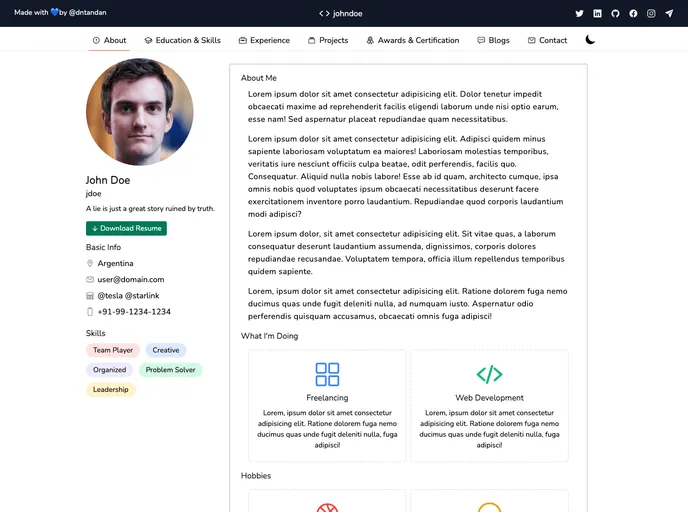
Overview:
The content is a guide that explains how to deploy a theme called “gitwind-portfolio” using Vercel. It also mentions some of the features of the theme, such as dark theme, integration with Next.js and TailwindCSS, and being mobile-friendly. The content provides installation instructions and invites contributions from users.
Features:
- Dark Theme: The theme has a dark mode option for a visually appealing experience.
- Next.js Integration: The theme is designed to work seamlessly with the Next.js framework.
- TailwindCSS Integration: The theme integrates with the popular CSS framework, TailwindCSS, for easy customization.
- Mobile-Friendly: The theme is optimized for mobile devices, ensuring a good user experience on smaller screens.
Installation:
To install the “gitwind-portfolio” theme, follow these steps:
- Install the theme with yarn by running the following command:
yarn add gitwind-portfolio. - Clone the project to your local machine.
- Navigate to the project directory.
- Install the required dependencies by using the command:
yarn install. - Start the server by running the command:
yarn start.
Summary:
The content provides a guide on how to deploy the “gitwind-portfolio” theme using Vercel. It highlights some of the key features of the theme, such as dark mode, Next.js and TailwindCSS integration, and mobile-friendliness. The installation instructions are provided for users to easily set up the theme. Overall, the content serves as a helpful resource for anyone interested in deploying the “gitwind-portfolio” theme using Vercel.





























































