


 Github Stars:
 Last Commit:
  Created:


Overview:
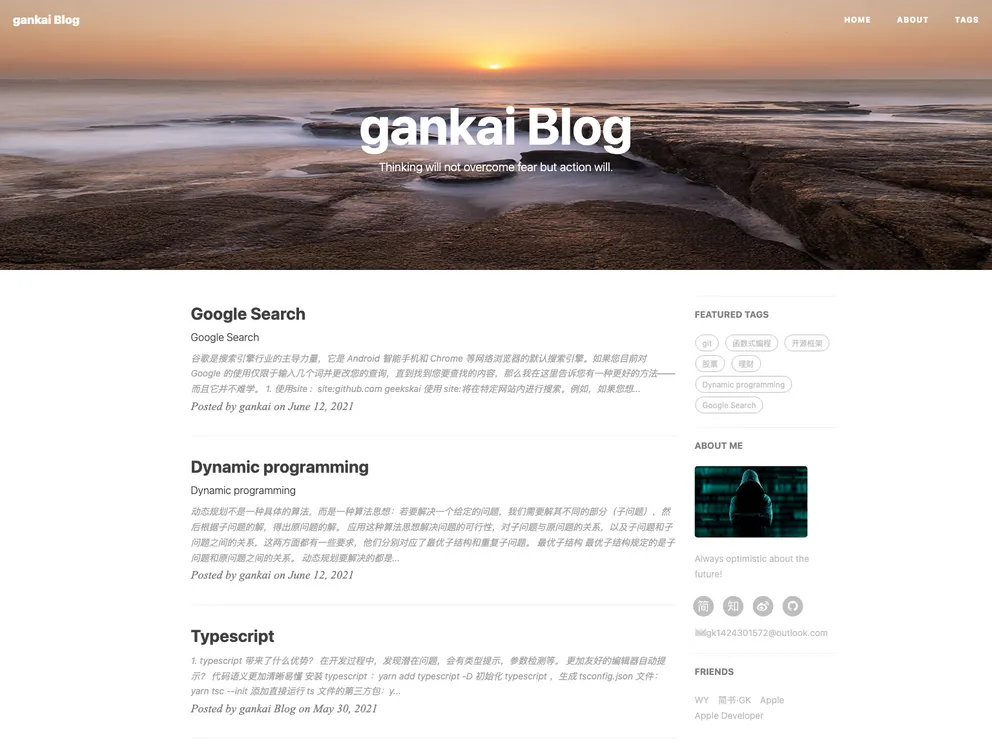
This article provides an overview of a blog theme that can be used to create a personalized blog. The theme supports various features such as a mini about me section, featured tags, social media accounts, friends’ links, keynote layouts, comments with Disqus and Gitalk, analytics with Google Analytics and Baidu Analytics, customization options, header images, SEO title, and instructions for installation and updates.
Features:
- Mini About Me: A responsive layout that displays your social media accounts below your profile picture.
- Featured Tags: A module that showcases recommended tags on the homepage based on the number of articles using the tag.
- Social Media Accounts: The ability to add and display various social media accounts on the sidebar.
- Friends’ Links: A section on all pages to display links to friends’ blogs and websites.
- Keynote Layout: Support for HTML5 slideshow layouts using frameworks like Reveal.js, Impress.js, Slides, and Prezi.
- Comments: Integration of Disqus and Gitalk comment systems, supporting Markdown syntax.
- Analytics: Support for website analytics using Google Analytics and Baidu Analytics.
- Customization: The ability to customize the theme by modifying the code in the
_include/and_layouts/folders. - Header Image: The option to select and display a custom header image for each page or post.
- SEO Title: The ability to define a custom title for SEO purposes and for sharing on social media.
- Page Build Warning: Instructions for updating the Jekyll environment and modifying the configuration file to resolve compatibility issues.
Installation:
To install the theme, follow these steps:
- If you have Jekyll installed, open the command line and run
jekyll serveorjekyll s. - Open your local browser and enter
http://127.0.0.1:4000/to preview the theme. - To make modifications to the theme, update the
_config.ymlfile. - Refer to the Jekyll official website for more parameters and settings.
Summary:
This article discusses a blog theme that provides various features and customization options for creating a personal blog. The theme includes modules for displaying social media accounts, recommended tags, friends’ links, and HTML5 slideshow layouts. It also supports commenting systems, website analytics, customization, and the ability to set header images and SEO titles. Installation instructions are provided, along with steps to resolve compatibility issues. Overall, the theme offers flexibility and customization for users to create their own unique blog.






























































