


 Github Stars:
 Last Commit:
  Created:

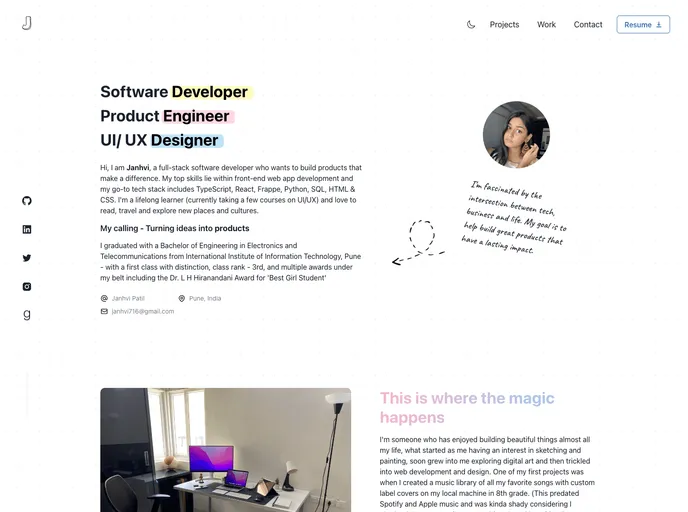
Overview
This content provides an introduction to a Next.js project called “portfolio-preview” that has been bootstrapped with create-next-app. It includes instructions on how to get started with the development server and make edits to the project. Additionally, it provides information on accessing API routes and offers resources for learning more about Next.js. The content also mentions the option to deploy the app using the Vercel Platform.
Features
- Next.js Project: The project uses Next.js, a popular framework for building React applications.
- Development Server: The content provides instructions on running the development server to see the results of the project.
- Editing the Page: Users can start editing the page by modifying the “index.tsx” file, with the page automatically updating as edits are made.
- API Routes: The project includes API routes, and the content explains how to access and edit these routes.
- Next.js Documentation: Users are directed to the Next.js documentation to learn more about the features and API of the framework.
- Learn Next.js Tutorial: An interactive tutorial for learning Next.js is recommended as a resource for further understanding.
- Deployment on Vercel: The easiest way to deploy the Next.js app is mentioned as using the Vercel Platform, and a link to the Next.js deployment documentation is provided.
Installation
To install the “portfolio-preview” theme, follow these steps:
- Ensure that you have Node.js installed on your computer.
- Clone the repository from the Next.js GitHub repository.
- In the project directory, run the command
npm installto install the necessary dependencies. - Start the development server by running the command
npm run dev. - Open your web browser and enter http://localhost:3000 to view the project.
Summary
The content provides an overview of a Next.js project called “portfolio-preview” and its key features. It offers instructions for installation and getting started with the development server. It also suggests resources for learning more about Next.js and mentions the option for deployment using the Vercel Platform. Overall, the content provides a helpful introduction to the project and its capabilities.






























































