


 Github Stars:
 Last Commit:
  Created:

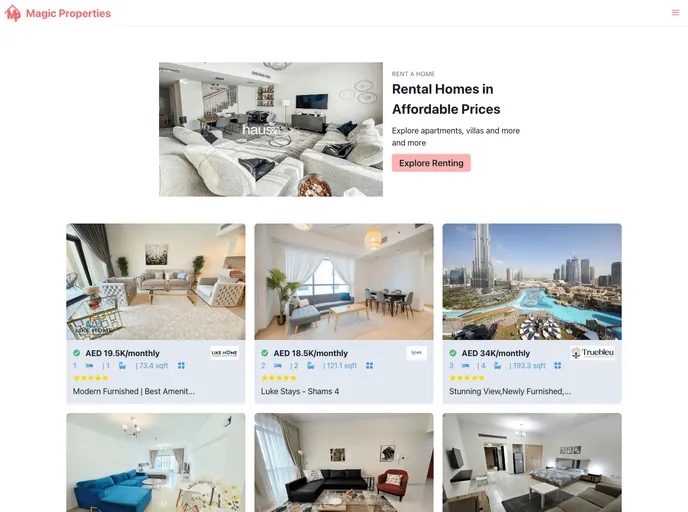
Overview
The Daily Visitors PRs Welcomehacktoberfest🚀 is a real estate web application built with Next.js version 12.1 for server-side rendering and Chakra UI version 2.2.1 for responsiveness. It uses the Bayut API for property details. The application has been deployed using Vercel at https://real-estate-web-app-sable.vercel.app/.
Features
- Server-side rendering with Next.js v12.1
- Responsive design with Chakra UI v2.2.1
- Integration with Bayut API for property details
Installation
To install the Daily Visitors PRs Welcomehacktoberfest🚀 real estate web application, follow these steps:
- Clone the repository by clicking on the fork button on the top of the page.
- Copy the URL of the repository.
- Open a terminal and run the following command, replacing “the copied URL” with the URL of the repository:
git clone "the copied URL" - Change to the repository directory on your computer.
- Create a branch using the following command:
git checkout -b your-branch-name - Make any necessary changes to the files.
- Add the changes to the branch using the following command:
git add . - Commit the changes using the following command:
git commit -m "Your commit message" - Push your changes to GitHub using the following command:
git push origin your-branch-name - Open your GitHub account, go to the repository, and click on the “Create pull request” button.
- Add a descriptive comment about the changes you’ve made and create the pull request.
Summary
The Daily Visitors PRs Welcomehacktoberfest🚀 is a real estate web application built with Next.js and Chakra UI. It integrates with the Bayut API for property details and has been deployed using Vercel. The installation process involves cloning the repository, making changes, and creating a pull request on GitHub.






























































