


 Github Stars:
 Last Commit:
  Created:


Overview
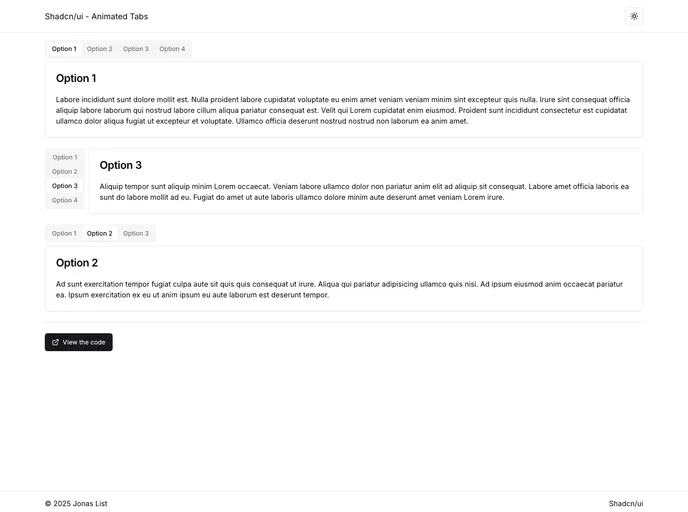
The Shadcn/UI - Animated Tabs project introduces a revitalized version of the traditional tab component by incorporating smooth animations that enhance user interactions. Developed using Next.js, this open-source initiative not only focuses on aesthetics but also prioritizes usability through dynamic theming and customizable features. Whether you are a developer looking to improve your application’s interface or a user wanting a more engaging experience, this project has something to offer.
With animated transitions that captivate users, the Shadcn/UI - Animated Tabs component transforms the experience of navigating between tabs. The smart integration of light and dark themes, alongside easily adjustable animations, makes this a versatile tool for any Next.js application.
Features
Animated Tabs: Enjoy visually appealing transitions as you switch between tabs, enhancing interactivity and user engagement.
Dynamic Theming: The tabs change responsively based on the selected theme, utilizing Shadcn’s CSS variables for a cohesive look.
Next.js Framework: Built on the robust Next.js framework, the component ensures optimized performance and server-side rendering.
Customizable Animations: Tailor the animations to match your project’s branding or user preferences, making it easy to create a unique experience.
Theme Switching: A dedicated theme switcher facilitates effortless toggling between light and dark modes, enhancing usability.
Easy Installation: The repository provides straightforward instructions for both CLI and manual installation, making integration a breeze.
Community Contribution: The project welcomes contributions, encouraging developers to propose improvements and share their own enhancements.





























































