


 Github Stars:
 Last Commit:
  Created: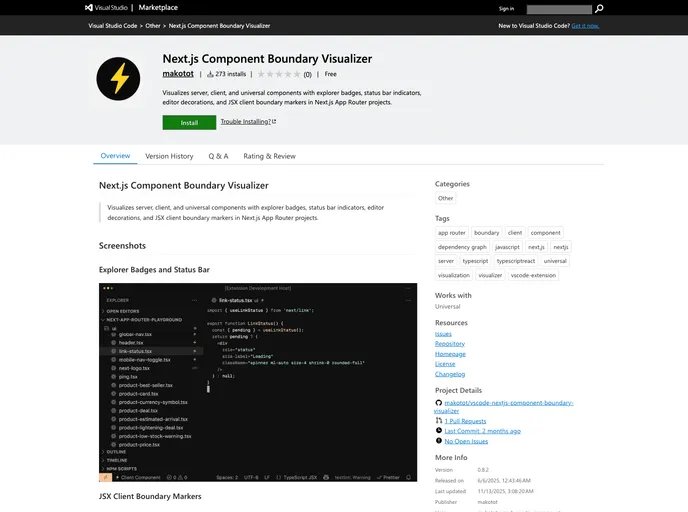
Overview
The Next.js Component Boundary Visualizer is a powerful tool designed specifically for developers working within the Next.js ecosystem, particularly those utilizing the App Router. This extension aids in visualizing the boundaries between server, client, and universal components, simplifying the development process by providing clear indicators and badges in Visual Studio Code. It streamlines how developers understand their component structure, enhancing productivity and reducing potential errors.
This tool stands out for its high-precision static analysis, utilizing TypeScript’s type checker to infer the nature of components in a project. It’s particularly useful for teams working with large codebases, as it provides immediate visual feedback and keeps track of changes in real time.
Features
- High-Precision Static Analysis: Uses TypeScript’s type checker and a dependency graph to accurately distinguish between server, client, and universal components.
- Explorer Badges: Displays intuitive icons (⚡️ for client and ♾️ for universal) right in the file explorer to quickly identify component types at a glance.
- Status Bar Indicators: Keeps the developer informed with the type of the currently open component—be it client, server, or universal—displayed in the status bar.
- JSX Client Boundary Markers: Highlights lines that render client components with a subtle end-of-line indicator (⚡️), enhancing visibility of boundaries.
- Line Decorations: Adds custom colored lines and icons in the editor for easy differentiation between client and universal components.
- Automatic Updates: Monitors file changes in real-time, providing immediate visualization adjustments for accurate data representation.
- Configurability: Allows users to set a custom path for their tsconfig.json file and enable or disable specific line icons according to personal preferences.
- Exclusion Settings: Users can exclude certain files or directories from analysis with glob patterns, tailoring the tool to their project needs.
This extension is an essential resource for Next.js developers, making code management more manageable and effective by providing visually accessible information.






























































