


 Github Stars:
 Last Commit:
  Created:


Overview
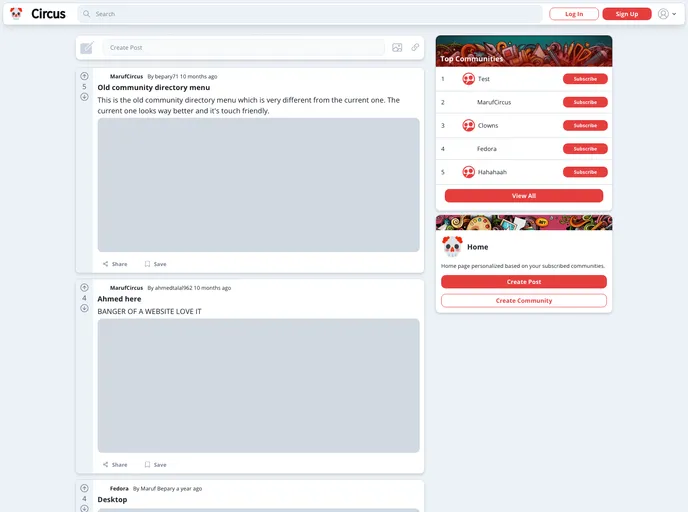
Introducing Circus, a simple yet powerful discussion platform that enables users to engage with each other in a variety of ways. Our platform is similar to popular sites like Reddit and Quora, but with a range of unique features that set us apart.
Our platform is designed to promote engagement and collaboration among users, with a wide range of community management features that enable users to create, subscribe to, and interact with communities on a variety of topics. We also provide a range of features to make it easy for users to create and view posts, including options for images, voting, and sharing.
In addition, we provide a robust set of user authentication and account management features, ensuring that our users have a seamless and secure experience. Users can sign up using email and password or third-party authentication providers such as Google and GitHub, log in and out, reset their password, and modify their profiles.
Our platform is also designed to be user-friendly and accessible, with a responsive UI that can be used on smartphones, tablets, or computers. Whether you’re an experienced user or just getting started, Circus has everything you need to engage with others and explore new ideas.
Features
- Authentication and Account Management: Users can sign up using email and password or third-party authentication providers. They can log in and out, reset their password, and modify their profiles.
- Community: Users can create and subscribe to communities. Admins can change or delete the community logo and change community visibility.
- Posts: Users can create posts with optional images, view all posts from a community, open posts to interact with them, view posts from subscribed communities, delete their own posts, vote on posts, and share posts.
- Comments: Users can create comments to reply to posts, view comments in a post, and delete their own comments.
- General: The platform is user-friendly and accessible, with responsive UI for different devices.
Installation
To run the Circus platform, you will need to meet the following requirements:
- Node 18 LTS
- Next.JS 12+
- Firebase V9
Once you have the above requirements set up, you can proceed with the following installation steps:
- Clone the Circus repository.
- Install dependencies by running the command
npm installin your terminal. - Set up your Firebase project and obtain the necessary credentials.
- Create a
.env.localfile in the root of the project and add your Firebase credentials. - Run the command
npm run devto start the development server.
Summary
Circus is a powerful discussion platform with unique features that set it apart from other popular sites like Reddit and Quora. With its community management features, users can create and interact with communities on various topics. The platform also offers convenient options for creating and viewing posts, as well as engaging with others through comments. With user authentication and account management features, as well as a user-friendly and accessible UI, Circus provides a seamless and secure experience for its users.





























































