


 Github Stars:
 Last Commit:
  Created:

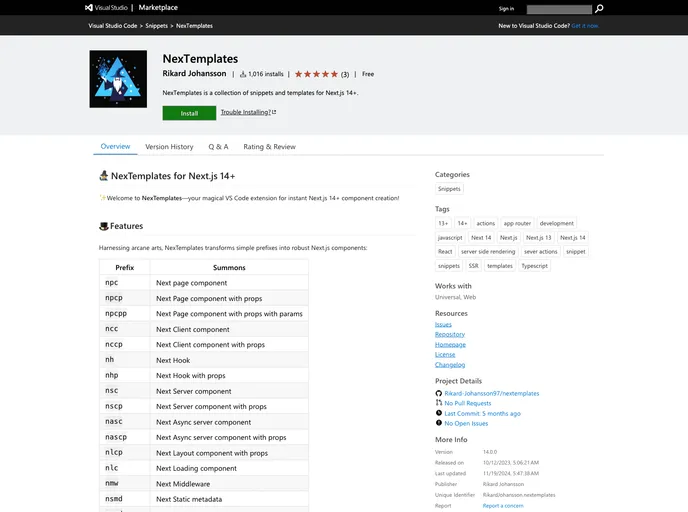
Overview:
NexTemplates is a VS Code extension that enhances Next.js 13+ development experience by providing a collection of code snippets. These snippets help generate Next.js components with ease, eliminating the need for repetitive boilerplate code. With NexTemplates, developers can quickly scaffold Next.js components by simply typing a prefix and customizing the generated code.
Features:
- Instant scaffolding: NexTemplates allows developers to generate Next.js components instantly, saving time and effort.
- Code snippets: The extension provides a wide range of code snippets, such as Next page components, Next client components, Next server components, Next layout components, and more.
- Customization: Each code snippet contains placeholders that can be customized by navigating through them using the Tab key.
- Integration with GitHub Copilot: NexTemplates can be combined with GitHub Copilot to further expedite coding with autogenerated suggestions and completions.
- Conformity with best practices: The snippets provided by NexTemplates adhere to the Vercel Style Guide and are directly sourced from the Next.js documentation.
Installation:
To install NexTemplates, follow these steps:
- Open Visual Studio Code.
- Go to the VS Code Marketplace.
- Search for “NexTemplates” in the search bar.
- Click on the NexTemplates extension.
- Click on the “Install” button.
- Wait for the installation to complete.
- Restart Visual Studio Code.
Summary:
NexTemplates is a powerful extension for Next.js development in Visual Studio Code. It offers a range of code snippets that allow developers to quickly generate Next.js components without the need for repetitive boilerplate code. With its seamless installation process and integration with popular tools like GitHub Copilot, NexTemplates enhances the development workflow for Next.js projects.






























































